It’s not for everyone, and that’s okay.
Daniel Cooper for Engadget
RATING : 8.9 / 10
- Great battery life
- Snappy performance
- Built with open-source software
- App UI could be a lot better
- Could do with some more first-party features
It's hard not to sound like a crank when talking about my ideal smartwatch given the prevailing trends. Apple, Samsung, Google and its partners have achieved the miracle of shrinking a general-purpose computing platform into a device that can sit on a wrist. The fancier models even have LTE radios, freeing them from the yoke of needing a smartphone at all. But, what if all you really want is a watch that operates as a companion to your phone, rather than a poor substitute? It was this line of thinking that defined the early smartwatch era, and I think things got a lot worse when we lost that sense of restraint.
So, imagine my delight to see Pebble, back from the dead after nearly a decade in limbo, offering something that now feels radical. Not because of what it does, but because of what it doesn't do. Because this isn't a fitness watch, or a general-purpose computing platform on the wrist, it's a second screen for your phone. You can read notifications, control music playback, check the weather and run basic apps that do a single job at a time. And that's it. This is a watch not for general-purpose users, but for everyone who feels that smartwatches got worse as their missions expanded.
There are few companies as rooted to the early 2010s zeitgeist than Pebble, whose rise and fall exemplified the age. The e-paper smartwatch was the first blockbuster Kickstarter hit, raising more than $10 million with almost 90,000 pre-orders. Almost overnight, Pebbles were the watch of choice for a class of tech devotees who understood the geeks were inheriting the Earth. Two years later, the company raised $20 million for the Pebble Time, with a color display and 80,000 more pre-orders.
Pebble bet the farm mainstream success would follow but, less than a year later, it would be dead, its leftovers bought by Fitbit for three percent of what the company was worth less than 18 months before. The wheel has since spun a few more times and, last year, Fitbit owner Google handed the trademark back to Pebble founder Eric Migicovsky. In January, he explained to me that his mission is to make a smartwatch that empowers its user. With 20,000 orders already, it's clear that even now, there's at least some demand for a different type of wearable.
Hardware
Daniel Cooper for Engadget
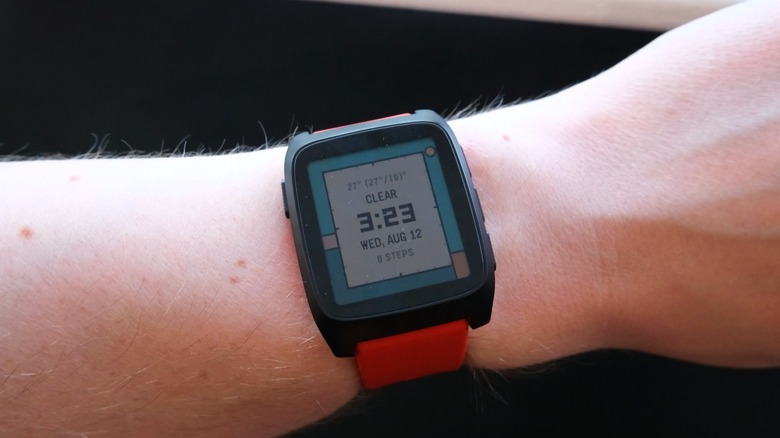
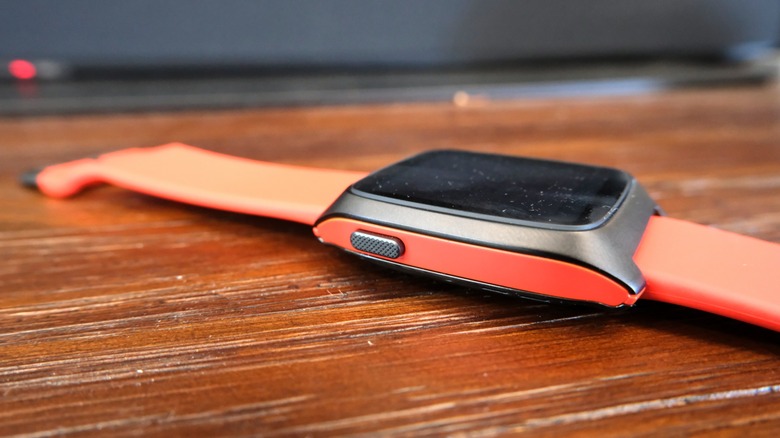
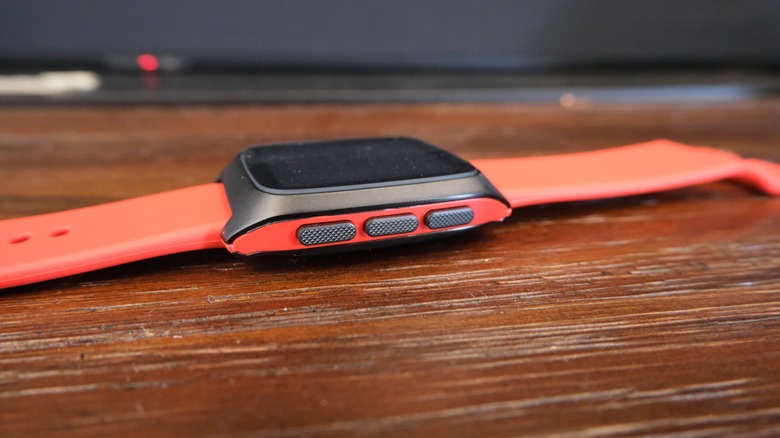
The Pebble Time 2 looks like it was plucked from the previous decade, because it kinda was. It uses a design laid down for a second-generation (OG) Pebble that never saw the light of day due to the company's demise. It's one heck of an upgrade, refining and tidying up the template, with a more integrated package and better colors. The watch feels a lot nicer than its predecessors, with a CNC-milled, PVD-coated body and stainless steel buttons with knurled edges. For all of Pebble's protestations (and the grousing from Reddit users) that its watches aren't designed for the rough and tumble world, they feel like they could take a beating.
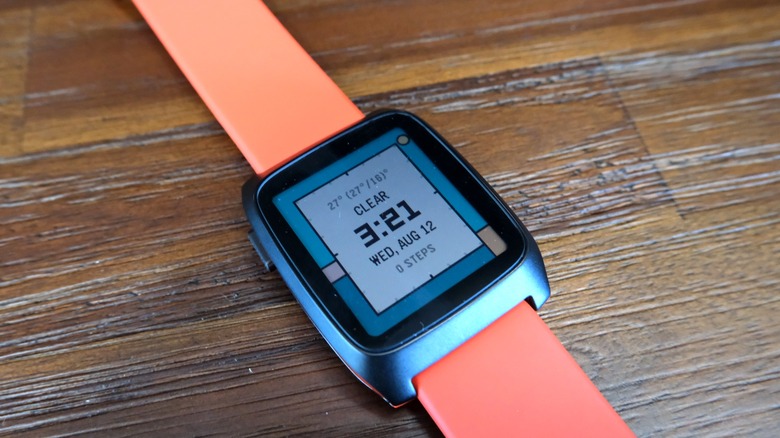
It has a 1.5-inch, 220 x 228, 64-color, always-on e-paper touchscreen which has been optically bonded to its Gorilla Glass crystal. You get the same quartet of buttons found on the original model; back on the left side, and up/down/select on the right. E-paper performs well in bright sunlight, but you'll probably need the backlight a little more than you might expect. You need to pick the right watchface too, because some of them aren't that readable in your peripheral vision. But when you chance upon the right one (Halcyon, it's Halcyon), you'll find things are just smooth from there on out. To trigger the backlight though, you'll need to flick your wrist quite hard, which took me a little while before I got the knack.
Inside, there's a SiFli system-on-chip, which is designed for low-power applications, alongside a 185mAh battery and 32MB flash memory. It's based on ARM's Cortex M33 dual-core platform from 2016, which helps affirm the throwback charm of the Pebble Time 2. Migicovsky jokes that the Pebble Time 2 is running on a "calculator chip" compared to the beefier silicon found inside Apple and Google's timepieces.
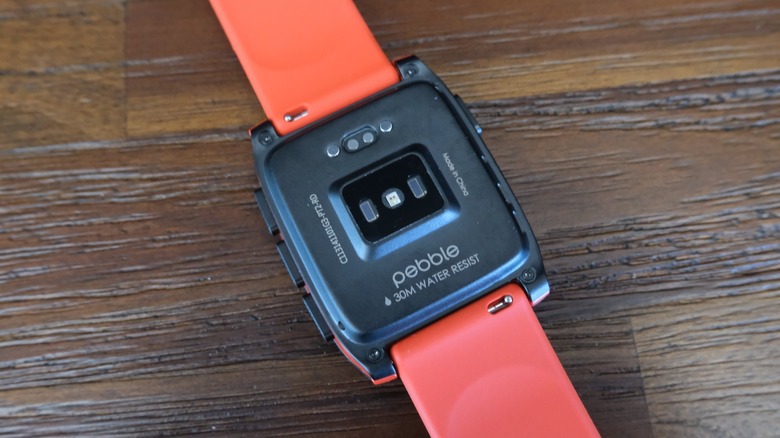
The bottom cover is held in place with screws to aid repair, and if you can use a soldering iron, it's possible to replace the battery. On the underside, you'll find the optical heart rate sensor and the magnetically-aligned pogo pins for charging. The Time 2 ships with a little charging adapter, designed by Nomad Goods, which is barely wider than the watch itself. At one end, there's a USB-C port, and you can just hook it up to a USB-C cable, making it wonderfully easy to travel with. Not that you should really need to worry given the Time 2's battery life, which should last for more than a week on a go.
My review unit is the Black and Red edition that ships with two different sizes of bottom straps, and it's certainly a good looking piece of kit. There's a 11 centimeter (approx 4.2 inches) strap, or a 14.5 centimeter (approx 5.6 inches) option, depending on the girthiness of your wrist. All the bands have 22mm quick-release catches, and the watch should work with any standard 22mm band you choose to buy off the shelf. Bear in mind that since the side of the watch has an accent color to match its strap, so if your fashion taste is changeable, it might be better to opt for the black model to avoid color clashes.
In-use
Daniel Cooper for Engadget
There's an overriding theme to every element of this watch, which is that you'll need to take a moment to customize things to your liking. You'll need to spend five minutes or so looking for a watch face you like, but there are thousands to choose from. One benefit of having an archive of faces made during Pebble's heyday is that someone probably already built the face you need. But once you've taken the time to get set up, you'll find the Time 2 is a very easy watch to live with. As the display is taller than wide, it's actually good for reading denser blocks of text, and it harnesses its verticality for its menus. Rather than trying to crowbar in app and menu elements into too small a frame, Pebble trusts you still know how to scroll.
Pebble insists that it's not made a fitness watch, but even so, it's got the basic tracking abilities we expect from every timepiece these days. You'll get a step count, sleep monitoring and with its PPG sensor, you'll be able to keep track of your heart rate. In the app, the layout is basic, just three graphs — but I do like the fact your step count is up against a graph showing your count from the week before. Every Thursday, I've been walking 1.5 miles to see friends and then back a few hours later — and I can see the outline of that goal when I wake up Thursday morning. After so many devices that try and crunch that data into conclusions or scores, a trio of graphs makes for a refreshing change.
Pebble's former owner, Fitbit, kept the company's devices alive for its first year before pulling the plug. At that point, the open-source community, under the Rebble name, took over the work of maintaining the ecosystem. Last year, Google made the PebbleOS open-source, and the app and OS in these new devices are completely open-source. That may conjure visions of well-made apps that seem to ignore every common sense human interface principle. But while the app isn't very polished, and is missing feature parity with the watch, it's not rough. And one side benefit of open-source is that there's actually some personality embedded in both the watch and the software. Activate the watch's DND mode — called Quiet Time — and you get a cute graphic of a tiptoeing mouse.
When you open the app, it speaks volumes that the first pane is for the app "store" rather than to manage the watch itself. Pebble is well aware its watches are platforms onto which you can add tools built by its community. I'd argue that goes too far: It would be nice if there was a built in Stopwatch and Timer app, rather than needing to hunt for a third party option. It's not as if it's difficult to pull down one or two free alternatives from the store, and installation is a breeze. But I'd like to see Pebble's admittedly-small team do a bit of leading from the front here, as the alternative is to scrub through the thousands of apps available like a kid in a candy store.
As part of this, anyone can rock up to CloudPebble, its cloud-based development environment with the promise of being able to build a watch face or app in under five minutes. I gave it a go, and while I expected to blunder my way through an attempt, it's too much JavaScript for me. Migicovsky says that a WYSIWYG interface is coming, but that non-coders, for now, will need to harness a Claude skill to cover the gap in their toolbox. Or, you can go the long way around and teach yourself JavaScript, which might be an equally fun hobby to take up.
There are plenty of things that I think Pebble could do to improve matters, especially within the companion app. Some settings that would be easy to tweak on the app are left entirely on the watch itself. For instance, you can only set Quiet Time on the watch, and have to set it twice: once for weekdays and once for weekends. And while the watch lacks GPS, I'd love to see it better integrate with your phone's turn-by-turn directions, as the third-party apps for navigation aren't great.
Performance and battery life
Daniel Cooper for Engadget
If there's one thing that makes reviewing the Time 2 hard, it's the decade-long gap from when I last used one. From my memory, the original Pebbles were no slouch, with snappy and responsive UIs. But it sure feels like the new unit is snappier, to the point where I don't think I've experienced even a nanosecond of lag. It may be running on a calculator chip, but PebbleOS is so lightweight that it doesn't really matter. Hell, even the fanciest of animations and transitions on this thing are only a few frames long.
Pebble says its users are reporting upward of 20 days on a single charge and that, if you try, you can hypermile it to get closer to a month. Of course, to do that, you'll need to use a low animation watchface, enable battery saver and go easy on it — which is what I didn't do. Instead, I tried to use the Time 2 as much as I possibly could, and at the time of writing, it's gone from 100 percent to 18 percent after eight days. I'd say that, with intensive use, you can easily get nine days from a single charge, which should be more than enough for most people.
Price and the competition
"Getting a Pebble in 2026 is a choice," proclaims the document the company sent along with the Time 2 review unit. It echoes a sentiment Migicovsky said a few times back in January, which is that Pebble isn't in the business of making a watch for general-purpose consumers. In his mind, if you want a fitness tracker, buy a Garmin. If you want the industry ideal for a watch, then Apple and Google have you covered. In essence, and to paraphrase The Rocky Horror Picture Show's Dr. Frank-N-Furter, "I didn't make it for you!"
The Pebble Time 2 is priced at $225, which feels more or less right for a device like this in the market we're currently experiencing. After all, it's a small hardware startup lacking the patronage of a corporate parent, trying to cater to a niche audience. It's making small batch runs of watches to meet customer orders, which in this day and age almost makes it an artisanal product. For a few dollars more, you can buy the Apple Watch SE 3, and for a hundred or more, you can get a Pixel Watch 5 or Apple Watch 11.
As for alternatives that sail closer to Pebble's own ethos, there's not really a mainstream option or rival. Certainly, there's no other ecosystem that straddles the gulf between packaged watches and entirely DIY jobs. There's the open-source BangleJS, which clearly requires you know a thing or two about coding to get working properly. And it doesn't appear there's an Android Wear/Wear OS watch that can be hacked sufficiently to turn it into something more like a Pebble. So if you're looking for a timepiece that can connect to your smartphone to do the very bare minimum, you might be left looking at one of Withings' hybrids. Or, you know, a Garmin.
Wrap-up
Daniel Cooper for Engadget
I've spent a decent amount of time self-correcting for nostalgia biases, and to avoid grading on a curve. After all, this may be a less ambitious device than an Apple Watch, but it doesn't just get praise for meeting its own lowered expectations. And it's worth pointing out this watch could have easily been launched in 2016, so it's hardly a bleeding-edge piece of gear. Which, if I'm honest, is perhaps another sign the tech world is slowly but surely eating its own tail.
But while the Pebble Time 2 isn't perfect, and in fact it's visibly imperfect in several ways, it's also a watch I'd probably choose over other smartwatches. Perhaps it's the limited feature set and focus on actually being a companion to my phone rather than a trinket in its own right. Perhaps it's the staggeringly good battery life, or the ability to expand its capability with apps made by other users. Or maybe it's the fact that it's not had every flaw and piece of whimsy polished out of it to the point where it has no personality of its own.
The Pebble Time 2 is probably not for you, and that's fine, because it fulfills a vital role for those of us who crave something less from their watches. And, if I'm honest, even if the majority of people don't want one of these things, the tech ecosystem desperately needs it.